
Time is the scarcest resource in modern workplaces. Are you drowning in repetitive tasks? Do approval processes bring projects to a halt? In 2026, AI workflow automation has evolved from a future concept into a practical business solution. Companies are using AI workflow automation tools to reduce repetitive tasks, improve collaboration, and create smarter digital workflows.AI technology is reshaping how we work. This article shows you how to leverage an AI autonomous agent workflow and a zero-touch workflow system to save 15.5 hours weekly and boost approval speed by 50%. Whether you manage a business or freelance, these practical strategies apply immediately.
1.Why Traditional Workflows Fail in 2026
1.1 Repetitive Tasks Consume Valuable Time
Data entry, email replies, and report generation—these tasks occupy 70% of your work time. Research shows that an AI autonomous agent workflow can now handle these daily tasks. What does this mean? You can focus on work requiring creativity and decision-making.
1.2 Slow and Chaotic Approval Processes
Projects get stuck in someone’s inbox. Nobody knows who approves next. Traditional email chains make communication inefficient. Automated approval workflow solves this completely. The system notifies the next reviewer automatically and generates clear audit trails.
1.3 Scattered Tools Create Information Silos
Design files live on one platform, feedback sits in emails, and final versions hide in another folder. This fragmentation makes team collaboration difficult. A design proofing tool centralizes all feedback, allowing direct annotation on design assets without switching tools.
2. How AI Workflow Automation Uses Autonomous Agents
AI autonomous agents go beyond automation tools. They understand context, make decisions, and execute multi-step tasks. Imagine this: you voice your ideas, and AI drafts a 1,000-word article in 30 minutes. This isn’t science fiction—it’s 2026 reality.
Real Case: 10x Content Creation Efficiency
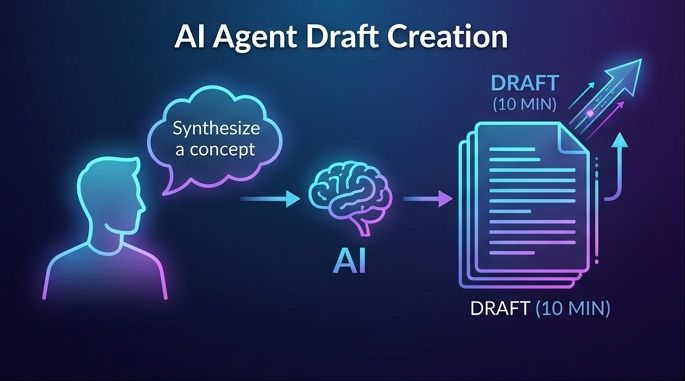
Traditional method: Research (2 hours) + Draft writing (2 hours) + Editing (1 hour) = 5 hours
Using no-code AI tools: Voice input core ideas (5 min) + AI generates draft (10 min) + Human refinement (15 min) = 30 minutes
This efficiency boost lets content creators, marketers, and business owners focus on strategy over execution.
3. Building a Zero-Touch AI Workflow System
The zero-touch workflow system transforms you from a “task executor” to a “system architect.” This system comprises three core components:
Brain (Large Language Model): Understands instructions, generates content, and makes decisions.
Nervous System (Automation): Connects different tools, triggers workflows, and passes information.
Memory (Database): Stores historical data, learns preferences, and optimizes processes.
Real-World Applications
Digital printing workflow optimization: From design submission to final print, the system automatically checks file specs, assigns approval tasks, and notifies production teams. As a result, equipment downtime drops 40%.
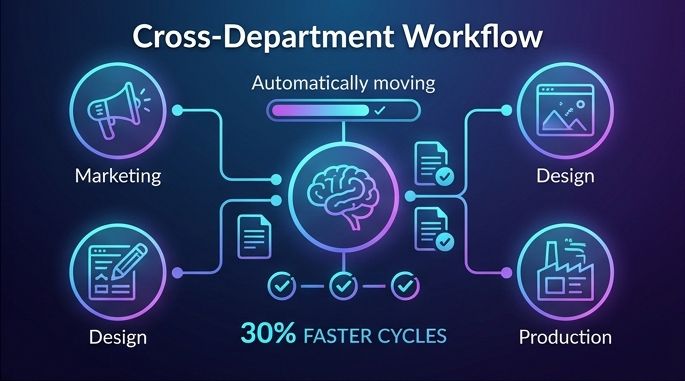
Cross-department collaboration: Marketing submits design requests, and the system auto-creates tasks, assigns designers, sets approval flows, and notifies stakeholders. Project cycles shrink by 30%.
4. AI Scheduling Automation for Smarter Productivity
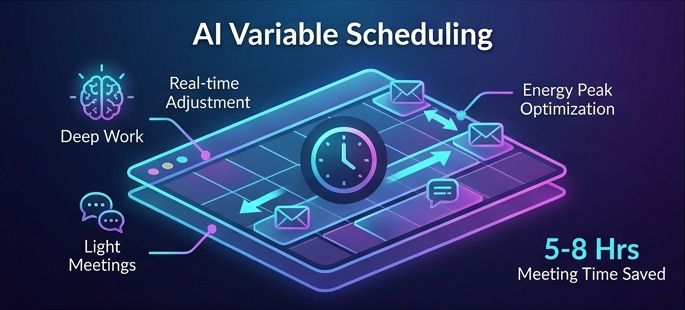
Traditional calendars are static. Meeting delayed? You manually reschedule all tasks. AI variable scheduling changes everything. The system understands your biological rhythms and work habits.
Energetic in the morning? The system schedules deep work blocks. Tired in the afternoon? It arranges light meetings and email processing. Client meeting suddenly canceled? The system instantly re-optimizes your schedule without your intervention.
Value for Executives and Professionals
Executives average 17 meetings weekly. AI scheduling systems identify which meetings can be merged, which can be handled asynchronously, and which require your personal attention. The result? Save 5–8 hours of meeting time weekly.
5. No-Code AI Workflow Automation Tools
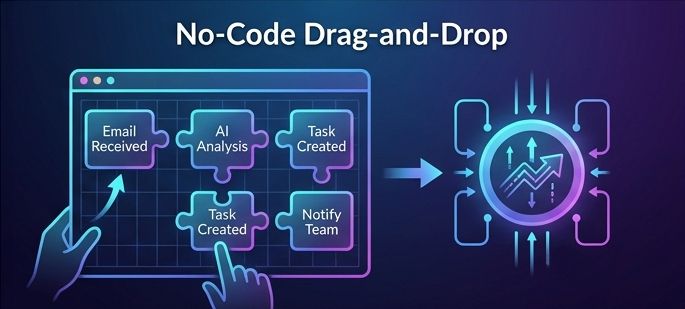
You don’t need to be a programmer. Modern no-code AI tools offer intuitive drag-and-drop interfaces. Describe your desired process in natural language, and the system builds it automatically.
Practical Example
Scenario: You want to automate customer feedback processing
Describe in natural language: “When customers send feedback emails, extract key info and create tasks.”
System auto-generates workflow: Email monitoring → AI analysis → Task creation → Team notification.
Test and deploy: The entire process takes under 15 minutes
This ease of use lets business people respond quickly to changes without waiting for IT. Workflows scale easily across departments or the entire company.
6. How to Implement AI Workflow Automation Step by Step
Phase 1: Select Pilot Project (1-2 Weeks). Choose a process with obvious pain points but low risk. Examples: meeting notes generation, design approval, and report compilation. Set clear success metrics: time saved, errors reduced, and satisfaction improved.
Phase 2: Optimize and Learn (2-4 Weeks) Collect user feedback, adjust workflow parameters, and document best practices. This phase aims to validate value and build confidence.
Phase 3: Expand to Other Areas (Ongoing) Replicate successful experiences in other departments, build internal expert teams, and continuously monitor results and optimize. Remember: workflow automation is a continuous improvement process.
Recommended Tool Platforms
GoProof: Professional design approval and collaboration platform, enabling 50% faster approvals.
Adobe CC Integration: Seamlessly connects creative tools with workflow systems.
Reality capture collaboration platforms: Ideal for architecture and engineering projects that require 3D visualization.
7. Frequently Asked Questions (FAQ)
Q6: What is AI workflow automation?
A: AI workflow automation is the process of using artificial intelligence to automate repetitive tasks, connect digital tools, analyze information, and optimize business workflows with minimal human intervention.
Q2: Will employees resist automation?
A: Communication is key. Emphasize AI as an assistant, not a replacement. Involve employees in process design and demonstrate how automation eliminates tedious tasks, allowing them to focus on more valuable work.
Q3: How is data security ensured?
A: Absolutely. Small teams often have limited resources, making the value of automation more obvious. Start with simple tasks like email auto-classification, meeting scheduling, and document generation.
Q4: Can small teams benefit too?
A: Absolutely. Small teams often have limited resources, making the value of automation more obvious. Start with simple tasks like email auto-classification, meeting scheduling, and document generation.
Q5: How do you measure success?
A: Track three core metrics: time saved (hours/week), process speed (approval cycles), and quality improvement (error rate reduction). Use built-in analytics dashboards to monitor these metrics.
Q6: What budget is needed to implement AI workflows?
A: Many no-code AI tools offer free trial versions. Small to medium businesses can start with $500–$ 2,000 per month. Considering the value of saving 15.5 hours weekly, ROI typically materializes within 3 months.
Conclusion: Embrace Automation, Unleash Potential
Workflow optimization in 2026 is no longer optional—it’s essential. AI autonomous-agent workflows, zero-touch workflow systems, and no-code AI tools are redefining efficiency boundaries. From saving 15.5 hours weekly to boosting approval speed by 50%, these aren’t empty promises but achievable goals. The key is taking action now. Choose a small project and experience the power of automation. Remember: the best workflows are those you barely notice. When systems run seamlessly in the background, you can focus on what truly matters—innovation, decision-making, and growth.